

Enter search queries below or use the tag links to the right to browse the knowledge base by category (Show All Tags).
Using the EMAIL command with Gmail
To use the EMAIL command with the smtp.gmail.com outgoing mail server you must connect on port 587 with Explicit TLS enabled. You can configure an Outbound Email server from the Configurator's Outbound Email page. See the example Gmail configuration below:
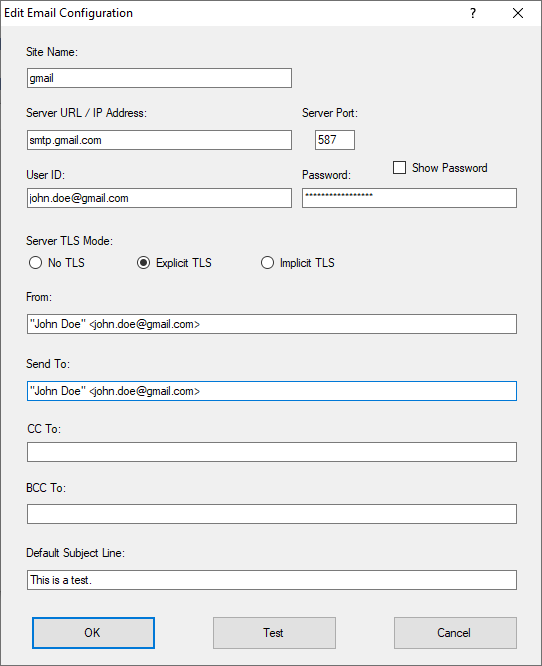
With that properly configured, the syntax for sending out an email will look something like this:
EMAIL "My message body" /to='[email protected]'
You can also specify the use of alternate Outbound Email configurations that you have set up in the Configurator, using the /server option, as below:
EMAIL "My message body" /to='[email protected]' /server=gmail
Gmail does not allow you to send attachments that could contain damaging executable code. Also note that with Gmail you can send messages up to 25 megabytes (MB) in size.
IMPORTANT
- This technique will only work if you do not have multi-factor authentication turned on for your Gmail account.
- Gmail is the property of Google Inc. so these connection requirements are subject to change.
Article last updated: 2021-12-06
Tags: Robo-FTP, email, SMTP